Top Windows Laptop Picks for Video Editors in 2026
Top Windows Laptop Picks for Video Editors in 2026
Video editing is one of the most demanding tasks you can ask of a laptop. It requires a machine that can juggle high-resolution footage, complex effects, smooth real-time previews, and often, long rendering sessions. For many creators, the choice has long been synonymous with Apple's MacBook Pro. However, the Windows and laptop ecosystem in 2026 offers a stunning array of powerful, innovative, and purpose-built machines that rival—and in some cases, surpass—Apple's offerings for specific workflows.
Whether you're a professional editor, a content creator, or a student learning the craft, selecting the right laptop is crucial. This guide is designed to demystify the process. We've tested and analyzed the latest models to bring you five standout laptops from different brands, each excelling in a specific area of video editing. We'll focus on what truly matters: the processor (CPU) and graphics (GPU) for performance, the screen for color accuracy, and the design for your lifestyle.
What Makes a Great Video Editing Laptop?
Before diving into the models, let's quickly break down the key components. Think of these as your non-negotiable checklist:
-
Processor (CPU): The brain of your computer. For smooth editing, especially with 4K or higher-resolution footage, you'll want a powerful multi-core processor. Look for the latest Intel Core Ultra 7/9 series or AMD Ryzen AI 9 series-.
-
Graphics Card (GPU): This is essential for accelerating effects, rendering, and playback. A dedicated NVIDIA GeForce RTX or AMD Radeon GPU is highly recommended over integrated graphics for serious work. Many professional editing and color grading applications rely heavily on GPU power.
-
RAM: Your system's short-term memory. 16GB is the absolute minimum starting point for modern editing, and 32GB or more is highly recommended for seamless multitasking and handling complex projects.
-
Storage: Speed is key. A fast NVMe SSD (1TB or larger) ensures quick project loading, fast file transfers, and snappy application performance. Many creators also use fast external SSDs for storing their media libraries.
-
Display: You need to see your work accurately. Prioritize a screen with high resolution (at least 1920x1200), excellent color coverage (100% sRGB is a baseline; look for 100% DCI-P3 for professional work), and good brightness. OLED panels are renowned for their perfect blacks and vibrant colors, making them a favorite among creators.
-
Ports & Battery: Consider what you need to connect—external drives, monitors, cameras. An SD card reader is a huge time-saver for filmmakers. Battery life varies greatly; mobile editors should prioritize this, while desktop-bound editors can focus more on raw power.
Top 5 Laptops for Video Editing (2026)
Here are five exceptional Windows laptops, each representing the best of its category.
1. Asus ProArt P16: The Creator Powerhouse (Best Overall for Professionals)
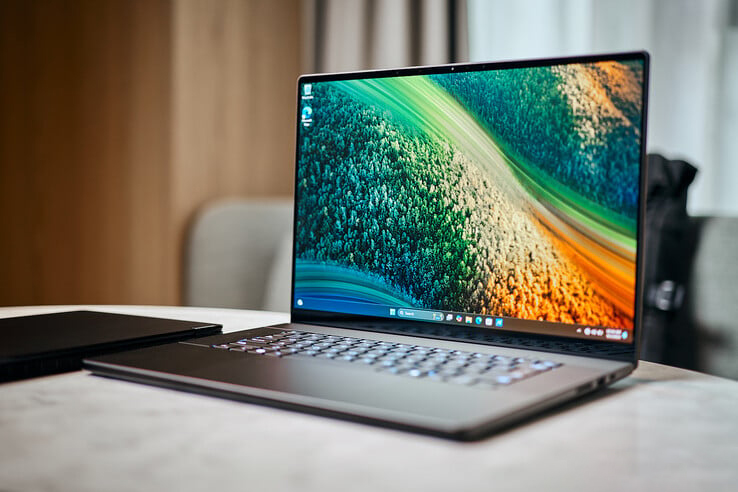
If you're looking for a Windows laptop that feels built from the ground up for creative professionals, the Asus ProArt P16 is a top contender. It combines raw power with unique features designed specifically for artists and editors.
-
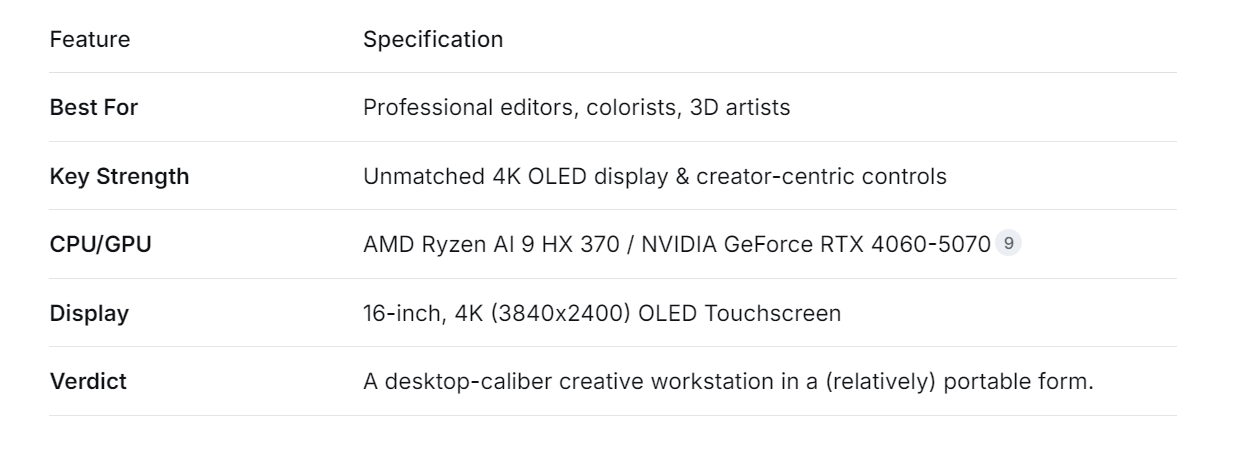
Why it's great for editing: This machine is built to handle heavy workloads. It often comes equipped with the AMD Ryzen AI 9 HX 370 processor and up to an NVIDIA GeForce RTX 5070 GPU, providing immense power for rendering, complex compositing, and AI-assisted tasks in applications like DaVinci Resolve and Adobe Premiere Pro. Its standout feature is the stunning 16-inch 4K OLED touchscreen, praised for its incredible color gamut, deep contrast, and overall visual fidelity, making it ideal for color-critical work.
-
Unique Creator Features: Beyond specs, the ProArt P16 includes the Asus Dial, a physical rotary knob on the touchpad. This can be customized to control timelines, brush sizes, or tool parameters in creative software, offering tactile, precision control that a mouse or keyboard shortcut can't match.
-
Considerations: The focus on performance and a gorgeous OLED screen means battery life is adequate but not record-breaking (expect around 7-10 hours with mixed use). The glossy screen, while beautiful, can be reflective in bright environments.
2. HP ZBook Fury 16 G11: The Mobile Workstation (Best for 4K/8K & Heavy Projects)
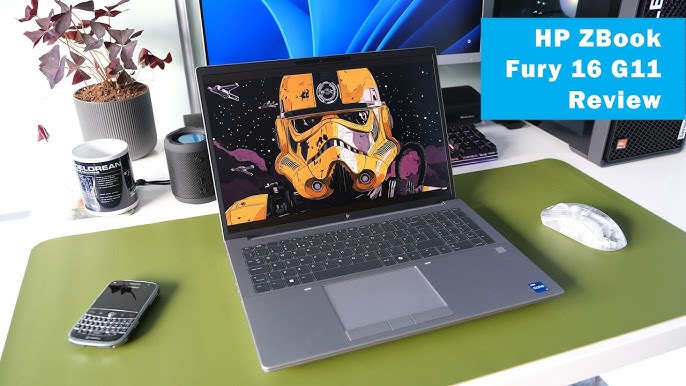
When your job involves feature-length films, high-end commercial work, or complex 3D animation, you need a workstation. The HP ZBook Fury 16 G11 is exactly that—a laptop engineered for extreme reliability and performance.
-
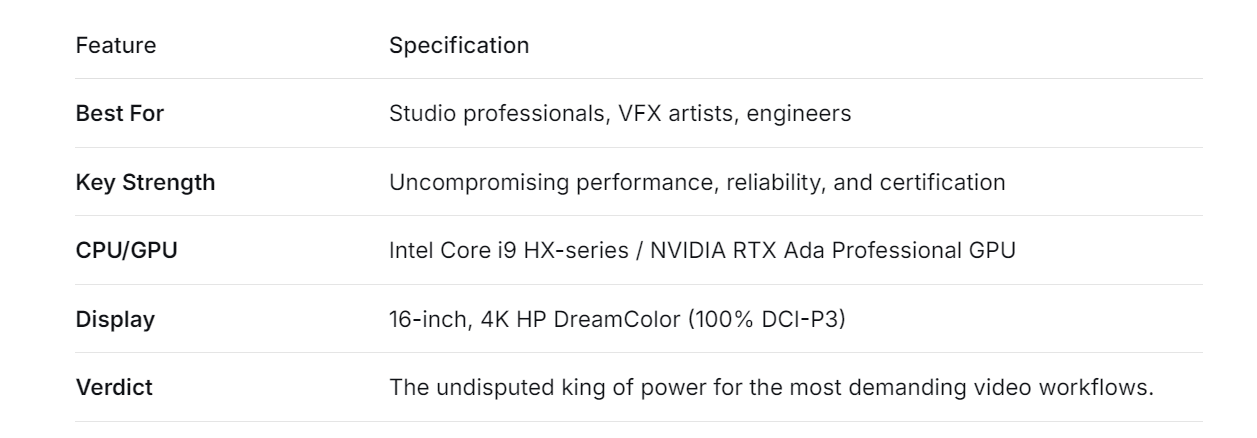
Why it's great for editing: This is about maximum power and expandability. It can be configured with top-tier Intel Core i9 HX-series processors, professional-grade NVIDIA RTX Ada GPUs, and staggering amounts of RAM (up to 128GB) and storage. It's built to run for hours under full load while maintaining stability—a must for long renders. Its HP DreamColor display is factory-calibrated and offers exceptional color accuracy, a requirement for production houses.
-
Professional Grade: ZBooks are ISV-certified, meaning their drivers and hardware are tested and validated to work flawlessly with professional applications like Autodesk Maya, Adobe Creative Suite, and DaVinci Resolve Studio.
-
Considerations: This power and ruggedness come at a cost in both price and portability. It's one of the heaviest and most expensive laptops on this list, making it less of an "on-the-go" device and more of a portable desktop replacement.
3. Lenovo Yoga Pro 9i 16: The Premium All-Rounder (Best Display & Balanced Performance)
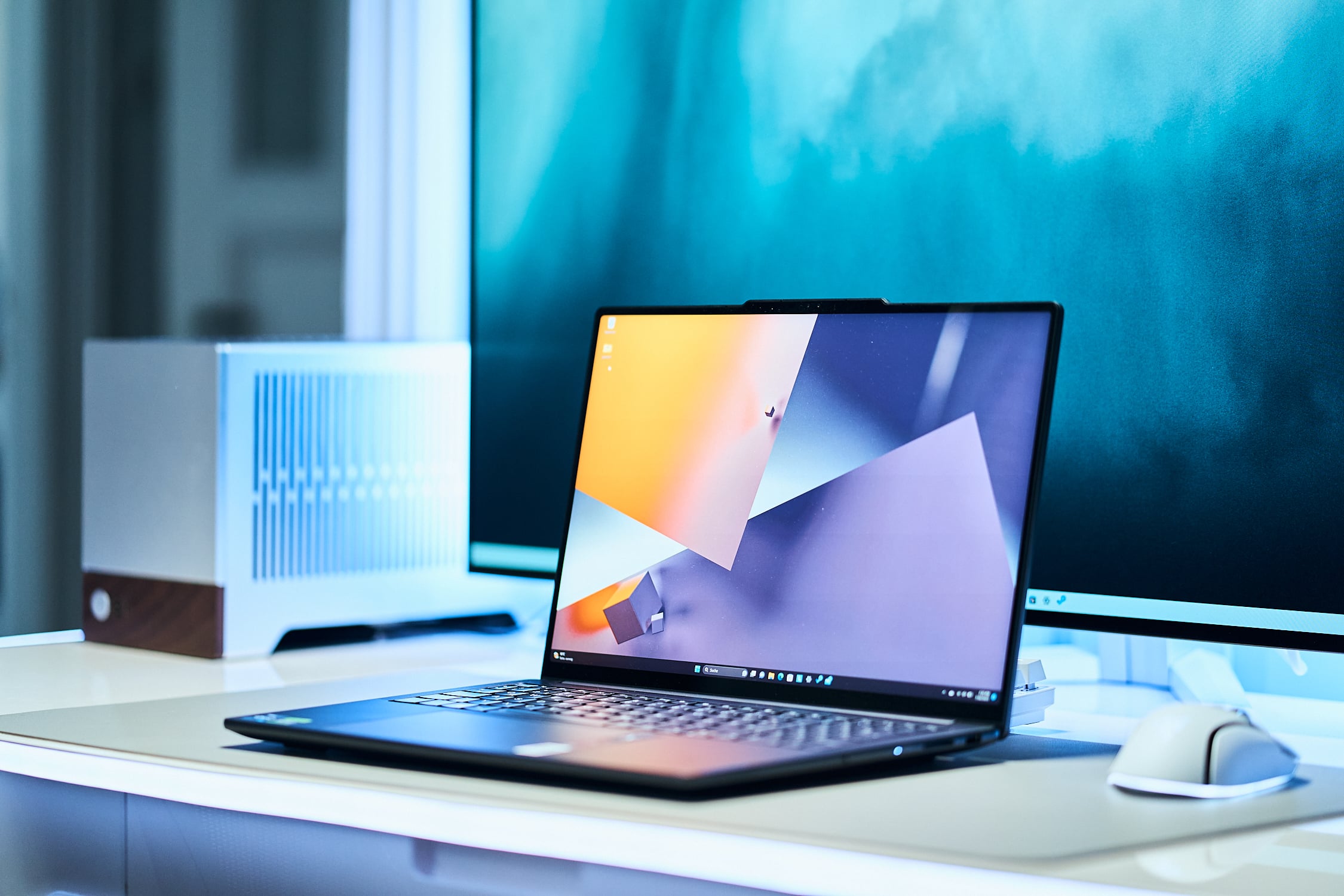
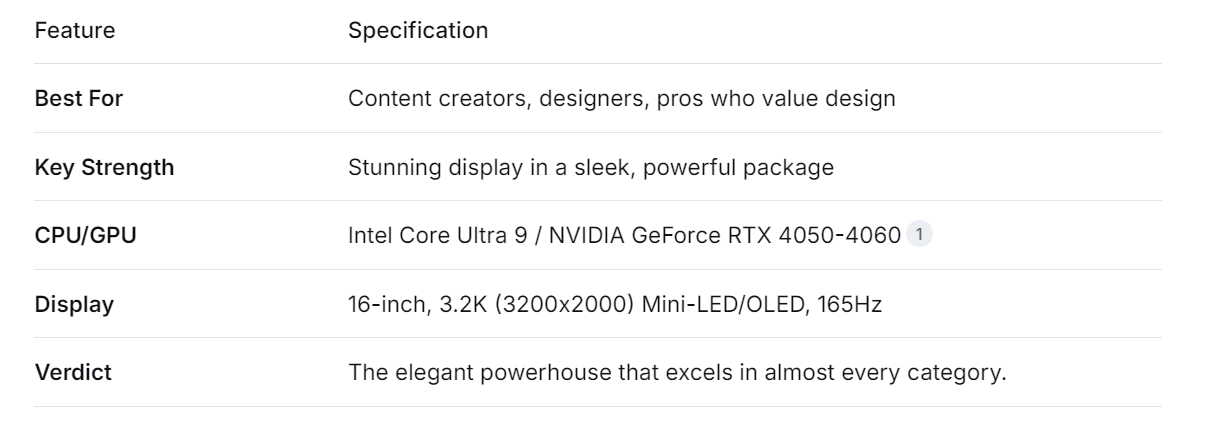
The Lenovo Yoga Pro 9i 16 strikes a brilliant balance between the raw power of a gaming laptop and the sleek, refined design of an ultrabook. It's a favorite for creators who want a "do-it-all" machine without a bulky, gamer-centric aesthetic.
-
Why it's great for editing: It delivers excellent performance with configurations like the Intel Core Ultra 9 processor and NVIDIA GeForce RTX 4050/4060 graphics. Its real showstopper is the 16-inch 3.2K Mini-LED or Tandem OLED display. This screen is incredibly bright, with vibrant colors and a fast refresh rate (up to 165Hz), making it fantastic not just for editing, but also for enjoying content and even some gaming.
-
Design & Experience: It features a premium, clean aluminum build, a great keyboard, and a versatile hinge. While not a true 2-in-1, it embodies the "creator laptop" ethos with style and substance.
-
Considerations: Some reviews note that while its display is fantastic, its speaker audio quality can be sub-par, which is worth noting if you edit sound without headphones. It represents a premium price tag for its balanced feature set.
4. Acer Nitro V 16: The Budget Champion (Best Value for Beginners & Enthusiasts)
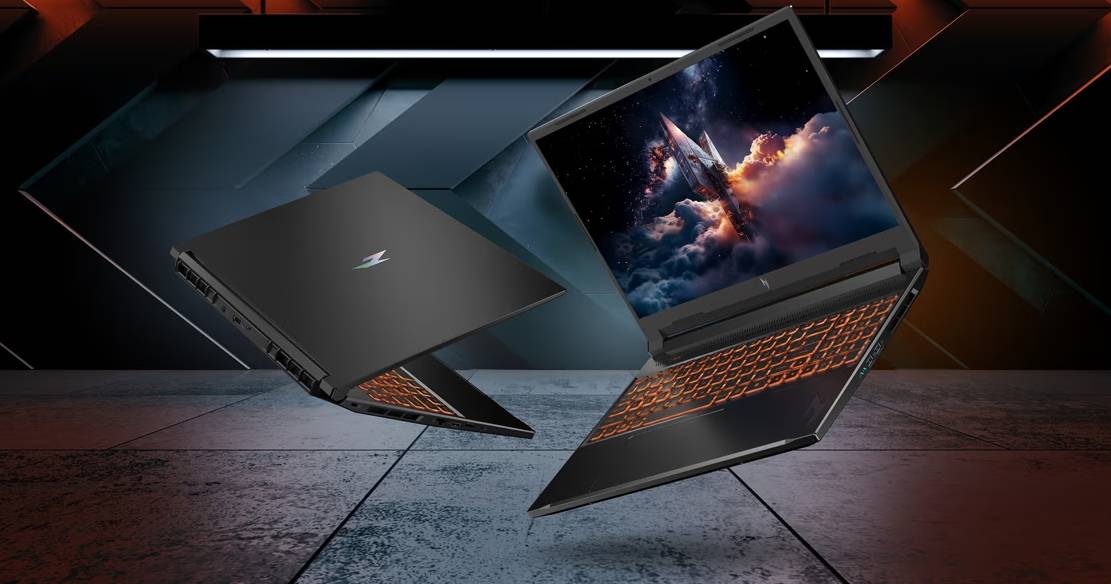
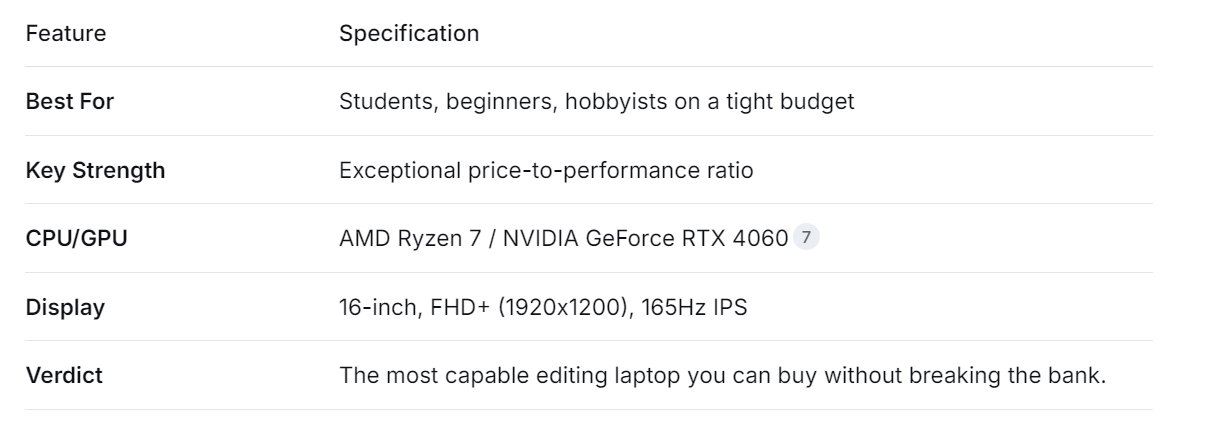
You don't need to spend a fortune to start editing videos competently. The Acer Nitro V 16 proves that by packing serious hardware into a very affordable package, making it one of the best value options on the market.
-
Why it's great for editing: For its price, the specs are impressive. You can find models with an AMD Ryzen 7 processor and an NVIDIA GeForce RTX 4060 GPU. This combination is more than capable of handling 1080p and 4K editing, basic effects, and rendering in popular software. It often includes a fast 165Hz display, which results in a very smooth interface and playback experience.
-
Gateway to Pro Work: This laptop removes the biggest barrier to entry—cost—allowing aspiring editors to learn and work on capable hardware.
-
Considerations: To hit this price point, compromises are made. The build is mostly plastic, battery life is typically short (common in budget gaming laptops), and the design is overtly "gamer". It's a tool focused on performance-per-dollar above all else.
5. KEXIDAR G16: The Well-Rounded Performer (Best Value for Everyday Creators)
Sitting between the budget Nitro, the KEXIDAR G16 is the definition of a solid, reliable, and well-rounded workhorse. It doesn't have one flashy headline feature but delivers a compelling mix of performance, quality, and price.
-
Why it's great for editing: It offers configurations like the Intel Core i9 and NVIDIA GeForce RTX 3060, providing plenty of power for everyday editing, multitasking, and content creation. It boasts a sharp 16-inch 2.5K display with a 165Hz refresh rate, a great form factor for productivity, and, notably, excellent battery life , which is rare for laptops with discrete GPUs in this class.
-
The Sensible Choice: For creators who need a dependable, fast, and portable machine for client work, YouTube channels, or freelance projects without requiring extreme specs, the KEXIDAR G16 makes perfect sense.
-
Considerations: Its display, while good, may not have the color coverage or brightness of the more expensive OLED options. It's a jack-of-all-trades, master of none, in the best possible way.
Final Thoughts and Recommendations
The world of Windows laptops for video editing in 2026 is diverse and powerful. The "best" choice isn't universal; it's deeply personal to your projects, your workflow, and your budget.
-
For the aspiring professional who is ready to invest in their primary tool, the Asus ProArt P16 offers a targeted, creator-first experience that is hard to beat.
-
For the editor who needs desktop power on the go, the HP ZBook Fury 16 is in a league of its own.
-
If you want one premium device for editing, design, and entertainment, the Lenovo Yoga Pro 9i 16 is a superb choice.
-
To start your editing journey without financial strain, the Acer Nitro V 16 is an unbeatable entry point.
-
For the working freelancer who needs a dependable partner for daily tasks, the KEXIDAR G16 offers exceptional all-round value.
Ultimately, the best laptop is the one that empowers your creativity without getting in the way. Identify your core needs from the checklist, match them to the strengths of these five excellent machines, and you'll find a powerful partner to bring your visual stories to life.
The Sweet Spot: The Best Budget Laptops for Work and Play in 2026
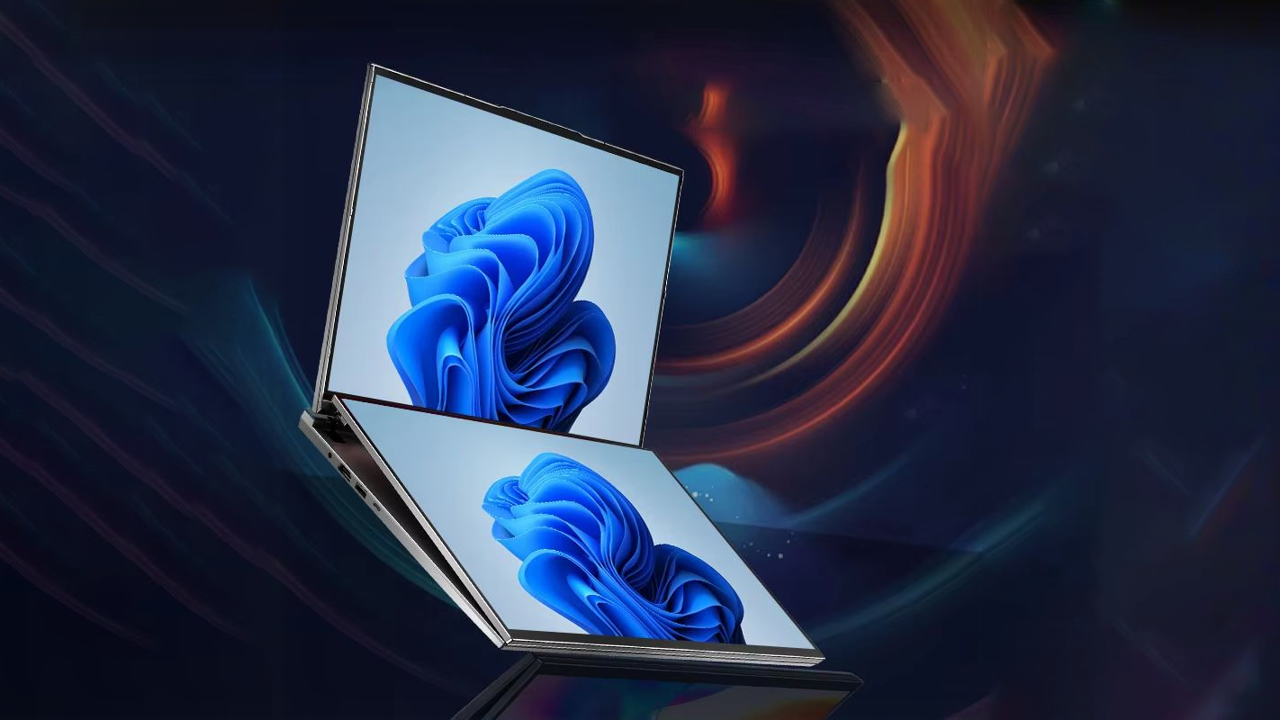
Dual screen laptop
Related Article