Choose the best laptop processor in 2025
Choose the best laptop processor in 2025
The 2025 Processor Landscape: More Than Just Speed
Today's laptop processors are marvels of engineering that blend raw power with specialized intelligence. Unlike older chips that relied solely on brute force, modern processors integrate dedicated AI engines called NPUs (Neural Processing Units), advanced graphics, and sophisticated power management systems. These components work together to handle everything from simple web browsing to complex video rendering—all while balancing performance against battery life and heat output. For everyday users, this means smoother multitasking, longer unplugged usage, and new capabilities like real-time photo enhancement or voice-controlled assistants that work offline.
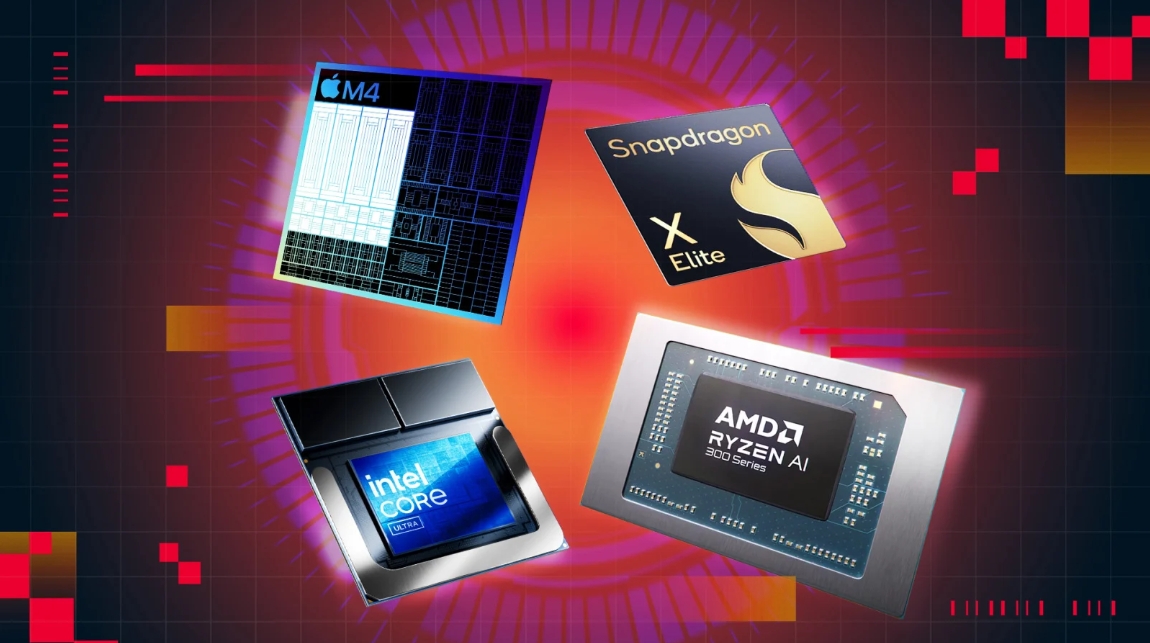
Four major players dominate the market: Intel, AMD, Apple, and Qualcomm. Each brings unique strengths to the table, whether it's Intel's leadership in AI-assisted productivity, AMD's dominance in gaming, Apple's legendary efficiency, or Qualcomm's breakthrough battery life. Understanding these differences is key to finding your perfect laptop match.
Contenders for the Crown: Processor Lineups Explained
-
Intel Core Ultra Series (e.g., Ultra 7 258V, Ultra 9 285HX)
Intel's 2025 chips are AI powerhouses, with integrated NPUs delivering up to 115 TOPS (trillion operations per second) for accelerating tasks like video background blur, speech-to-text conversion, and photo editing. Their hybrid architecture combines high-performance cores (P-cores) for demanding apps with efficient cores (E-cores) for background tasks, enabling excellent multitasking. Models like the Ultra 9 285HX offer desktop-grade performance for gaming or 3D rendering, while the Ultra 7 258V in ultrabooks like the ThinkPad X1 Carbon excels in business environments with its 17W power efficiency and robust integrated graphics (Intel Arc 140V) . -
AMD Ryzen AI/HX Series (e.g., Ryzen 9 7945HX, Ryzen 7 9800X3D)
AMD shines in gaming and creative workloads. The Ryzen 7 9800X3D features revolutionary 3D V-Cache technology, stacking extra memory directly onto the CPU die. This delivers up to 30% higher frame rates in games like Cyberpunk 2077 by reducing data access delays. For content creators, the Ryzen 9 7945HX (16 cores/32 threads) dominates multi-threaded tasks like Blender rendering, completing jobs 22% faster than previous generations. AMD's Ryzen AI chips also integrate powerful NPUs (up to 50 TOPS), making them versatile for both gaming and AI-enhanced creative apps. -
Apple M4 Series (e.g., M4, M4 Pro, M4 Max)
Apple's system-on-a-chip (SoC) designs prioritize battery life and seamless integration. The base M4 (in MacBook Air) handles photo editing and 4K video playback effortlessly for up to 18 hours on a charge—thanks to its ultra-low idle power (under 5W). The M4 Max (in MacBook Pro) scales up dramatically with a 16-core CPU and 38-core GPU, rivaling high-end desktop workstations. It excels in professional video editing and 3D modeling, outperforming even Apple's prior M2 Ultra in some tasks. macOS optimization ensures apps like Final Cut Pro run with minimal energy waste. -
Qualcomm Snapdragon X Series (e.g., X Elite, X Plus)
Qualcomm's ARM-based chips are battery-life champions. The Snapdragon X Elite in laptops like the Dell XPS 13 achieves 19+ hours of video playback and supports fanless designs for silent operation. Its 45 TOPS NPU enables advanced on-device AI, such as live translation and Windows Studio Effects. While gaming performance lags behind Intel/AMD, it handles office apps and streaming with remarkable efficiency. The Snapdragon X Plus offers similar AI and battery benefits at lower price points, as seen in the value-focused Microsoft Surface Laptop 5810.
Table: Key Processor Specifications Compared
| Processor | Best For | AI Power (TOPS) | Battery Life | Notable Feature |
|---|---|---|---|---|
| Intel Ultra 9 285HX | Gaming, AI tasks | 115 | 6–8 hours | Highest gaming clock speeds |
| AMD Ryzen 7 9800X3D | High-FPS gaming | 50 | 5–7 hours | 3D V-Cache for faster frames |
| Apple M4 | Everyday efficiency | 38 | 18 hours | Industry-best efficiency |
| Snapdragon X Elite | All-day productivity | 45 | 19+ hours | Fanless, cool operation |
Matching Processors to Your Needs: A Scenario Guide
Productivity & Business Use
For office work, web browsing, and video calls, prioritize battery life and responsiveness:
-
Snapdragon X Elite/X Plus: Ideal if you’re constantly mobile. Laptops like the Dell XPS 13 (19+ hours) or ASUS Vivobook S 15 let you work all day without hunting for outlets. Their NPUs handle Windows 11’s AI features seamlessly 5810.
-
Intel Core Ultra 5/7: Choose this for Windows-centric offices needing broad software compatibility. The ThinkPad X1 Carbon (Ultra 7 258V) offers legendary keyboard comfort, Thunderbolt 4 ports, and 10-hour battery life .
-
Apple M4: The MacBook Air is perfect for Apple ecosystem users. Its silence (no fan), vibrant Retina display, and unmatched app consistency make it a stress-free choice.
Gaming & High-Performance Applications
Gaming, streaming, and engineering software demand raw power and advanced graphics:
-
AMD Ryzen 9/7 with 3D V-Cache: The Ryzen 9 9955HX or Ryzen 7 9800X3D are top picks for competitive gaming. Paired with an RTX 4070 or better, they sustain 240+ FPS in esports titles like Valorant. The Lenovo Legion Pro 5 balances price and performance here.
-
Intel Core Ultra HX Series: The Ultra 9 285HX in laptops like the Honor MagicBook Hunter Edition leverages high clock speeds (up to 5.6 GHz) for AAA games. Combined with an RTX 5070 GPU, it handles ray-traced titles at QHD resolution.
-
Apple M4 Max: For game developers or creative pros, the MacBook Pro edits 8K video and renders complex scenes efficiently. Its unified memory architecture avoids GPU bottlenecks 7.
Creative Work (Design, Video, Engineering)
Software like Adobe Premiere, AutoCAD, or Revit requires multi-core muscle and professional GPUs:
-
Intel Core Ultra 9/AMD Ryzen 9 HX: Opt for workstation laptops like the HP ZBook Fury 16 G11 (Intel) or ProArt Studiobook (AMD). Their RTX 5000 GPUs offer certified drivers for stable 3D modeling, while 12+ CPU cores accelerate renders.
-
Apple M4 Pro/Max: The 14-inch MacBook Pro delivers superb color accuracy (XDR display) and outperforms many x86 laptops in video exports. Ideal for photographers and editors.
On-the-Go Portability
If weight and battery are critical:
-
Snapdragon X Series/Apple M4: Devices like the MacBook Air (1.24 kg) or Snapdragon X Elite laptops (e.g., Surface Laptop) last 18+ hours and weigh under 1.3 kg.
-
Intel Ultra 7 U-series: The ThinkPad X1 Carbon Gen 13 (0.99 kg) packs a full Windows experience in a sub-1kg body with 10-hour endurance.
Smart Buying Tips: Beyond the Spec Sheet
-
Thermals & Power Limits: A processor’s performance depends heavily on cooling. A Core Ultra 9 in a slim laptop like the Honor MagicBook Pro 16 (35 dB under load) may run slower than in a bulkier Lenovo Legion Pro 7i with vapor-chamber cooling.
-
RAM & Storage: Pair powerful CPUs with sufficient memory:
-
Productivity: 16GB RAM + 512GB SSD
-
Gaming/Creative: 32GB RAM + 1TB SSD (upgradeable preferred) 14
-
-
Screen & Ports: Designers need 100% DCI-P3 color coverage (e.g., HP ZBook Studio’s 16-inch 120Hz panel). Gamers should prioritize 240Hz+ refresh rates (ASUS ROG Strix G16). Thunderbolt 4/USB4 ensures fast data transfers.
-
Budget & Deals:
-
Under $1,000: Dell G16 (Core i7 + RTX 4060) for 240Hz gaming
-
$1,000–$1,500: MacBook Air M4 or ASUS Vivobook S 15 (Snapdragon X Elite)
-
High-end: Lenovo Legion Pro 7i (RTX 5090 + Ultra 9 285HX) for uncompromised performance.
-
Table: Top Processor Picks by Use Case
| Use Case | Recommended Processor | Example Laptop | Why It Wins |
|---|---|---|---|
| Business travel | Snapdragon X Elite | Dell XPS 13 (2025) | 19-hour battery, fanless silence |
| Competitive gaming | AMD Ryzen 7 9800X3D | ASUS ROG Strix G17 | 240Hz screen, 30% faster frame rates |
| Video editing | Apple M4 Max | MacBook Pro 16-inch | M4 GPU acceleration, studio-grade screen |
| Budget productivity | Intel Core Ultra 5 | ThinkBook 14 | 10+ hours battery, under $900 |
The Verdict: What to Buy in 2025
-
Most Users (Office/Study): Snapdragon X Elite or Apple M4 for hassle-free, all-day use.
-
Gamers & Creators: AMD Ryzen 9 7945HX/9800X3D or Intel Ultra 9 285HX, paired with a dedicated GPU (RTX 4060 or better).
-
Professionals (CAD/Video): Workstation CPUs in mobile workstations (e.g., HP ZBook) or Apple M4 Max for stability.
The "best" processor hinges entirely on your needs—not benchmark scores. By matching your primary tasks to a chip’s strengths, you’ll enjoy a faster, longer-lasting, and more satisfying laptop experience.
"Processors are like engines: a sports car’s power is wasted in city traffic, while a hybrid’s efficiency won’t win races. Choose the right one for your journey."
How to Right-Click on a Laptop
How to add ram to a laptop
Related Article